
How to Verify Your BettorEdge Account
Verify your identity on BettorEdge to unlock deposits, real-money trades and contests, and payouts. Here's what you need, how it works, and what to do if it doesn't go through.
Before you start
- •Have a valid, unexpired government ID: a driver's license, state ID or passport.
- •Use good light and a flat surface so the photos have no glare.
- •Your account name and date of birth must match your ID exactly.
Prerequisites
- •A BettorEdge account (see How to get started).
- •Location services on, in an eligible state.
- 1
Open Account, then Profile & identity
Click your account menu, choose Account, then Profile & identity. Identity verification is at the top. If you're not verified yet, start it there or from the verify prompt in the app.
- 2
Confirm your name and date of birth
Enter your full legal name and date of birth exactly as they appear on your ID. These fields lock after verification, so a typo here is the most common reason a check fails.
- 3
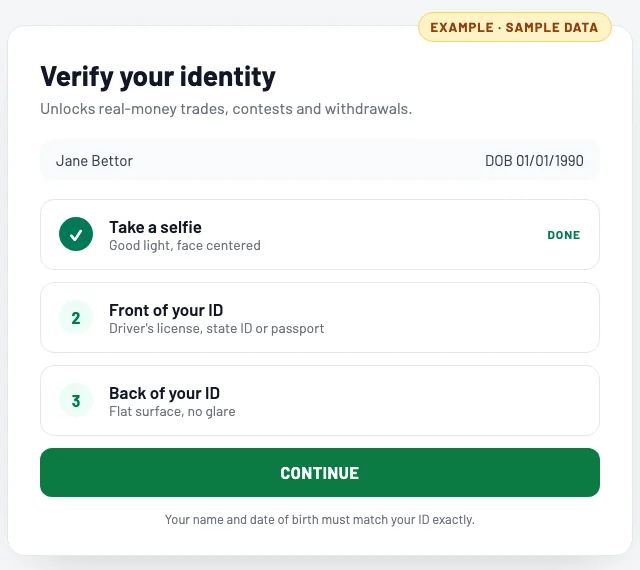
Take a selfie, then photograph the front and back of your ID
Follow the prompts: a selfie first, then the front of your ID, then the back. Accepted IDs are a driver's license, state ID or passport. Use good light and keep the whole card in frame. (The screen shown is an example with sample data.)
- 4
Check that you're verified
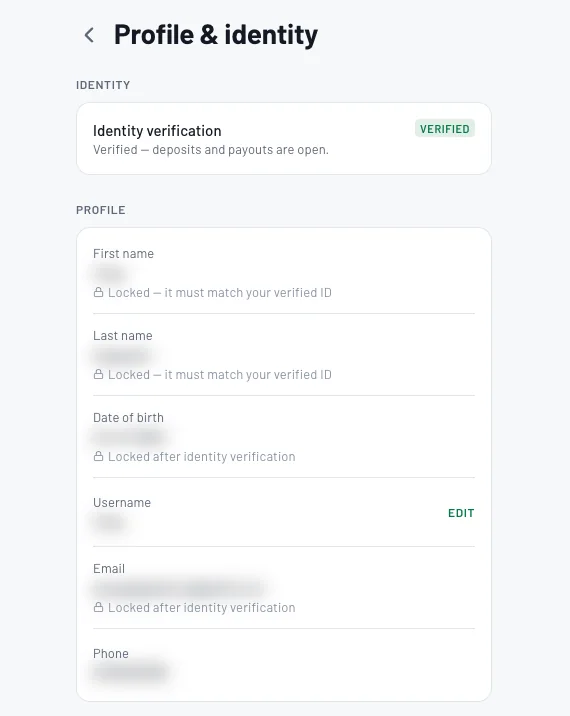
Most verifications are processed right away, and any that need a manual review are done within 24 hours. When yours is done, Profile & identity shows Verified: deposits and payouts are open, and your name and date of birth show as locked to your ID.
Tips
- •Most verification problems are an expired ID, glare on the photo, or a name or birthday that doesn't match the ID.
- •After you verify, your legal name and date of birth are locked to your ID, so check them before you start.
- •Location has to be on every session for real money, not just when you verify.
Questions
What ID can I use?+
A valid driver's license, state ID or passport. It must not be expired.
Why did my verification fail?+
Usually an expired ID, glare or blur in a photo, or a name or date of birth on your account that doesn't match the ID. Fix the mismatch or retake the photos in good light.
How long does verification take?+
Most verifications are processed right away. If yours needs a manual review, it's done within 24 hours. Still waiting after that? Contact support from Account → Email support.
Why do you need my location too?+
Real-money play is only open in some states, so BettorEdge confirms your location for real-money activity. Turn off any VPN.
Expected outcome
Your account shows Verified: deposits and payouts are open, so you can deposit, trade real money, enter real-money contests and withdraw.
Try it on BettorEdge.
Create your account and follow along in the app. Sign up for a shot at up to $100. No deposit needed.
Questions? Ask on r/BettorEdge, where the BettorEdge team answers.